How to use
Flet-Easy presents a flexible structure that allows you to easily connect multiple files to a main application. Flet-Easy supports both Imperative and Declarative programming styles.
Supported Modes
- Imperative Mode: The traditional way of building with Flet using
page.views.append(). - Declarative Mode: A more modern, React-like approach using the
@ft.componentdecorator where the UI reacts to data changes automatically.
- To use
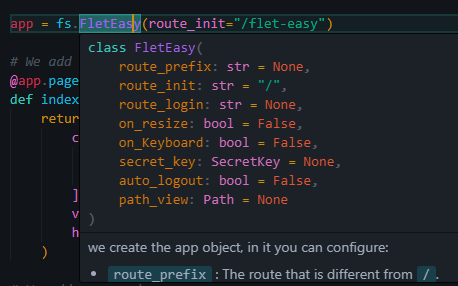
Flet-easy, first instantiate theFletEasyclass and configure the app object.
FletEasy
We create the app object, in which you can configure:
route_prefix: The route that is different from/.route_init: The initial route to initialize the app, by default is/.route_login: The route that will be redirected when the app has route protection configured.on_keyboard: Enables the on_keyboard event, by default it is disabled (False). [See more]on_resize: Triggers the on_resize event, by default it is disabled (False). [See more]secret_key: Used withSecretKeyclass of Flet-Easy, to configure JWT or client storage. [See more]path_views: Configuration of the folder where are the .py files of the pages, you use thePathclass to configure it. [See more]
Demo
Example
Methods
run(): Execute the app. Supports async, fastapi and export_asgi_app. [See more]add_middleware(): Requires a list of functions or classes. [See more]add_pages(): Add pages from other files. In the list you enter objects of class AddPagesy. [See more]add_routes(): Add routes without the use of decorators. [See more]
Decorators
page(): Decorator to add a new page to the app. This decorator method acts similarly to thePagesyclass and contains the same required parameters. [See more]config: Decorator to add a custom configuration to the app. [See more]login: Decorator to add a login configuration to the app (protected_route). [See more]page_404(): Decorator to add a new custom page when not finding a route in the app. [See more]view: Decorator to add custom controls to the application, the decorator function will return theViewsy. Which will be obtained in functions withdata:fs.Datasyparameter and can be added to the page view decorated withdata.view. [See more]config_event_handler: Decorator to add flet page event configurations. [See more]
How to create a new page?
To create a new page you use a decorator that provides the object created by the FletEasy class, which is page that allows you to enter certain parameters.
Decorator page
Available since version 0.3.0
index: Define the index of the page, use in controls likeft.NavigationBarandft.CupertinoNavigationBar.cache: Boolean that preserves page state when navigating. Controls retain their values instead of resetting. Works in imperative mode, but not in declarative (@ft.component). (Optional)
To add pages, the following parameters are required:
route: text string of the url, for example('/FletEasy').title: Defines the title of the page.page_clear: Removes the pages from thepage.viewslist of flet (optional).share_data: Is a boolean value, useful if you want to share data between pages, in a more restricted way (optional). [See more]protected_route: Protects the page path, according to thelogindecorator configuration of theFletEasyclass (optional). [See more]custom_params: To add parameter validation in the custom url using a dictionary. [See more]middleware: Acts as an intermediary between different software components. It can be used in the app in general, as well as in each of the pages (optional). [See more]index: Define the index of the page, use in controls likeft.NavigationBarandft.CupertinoNavigationBar.cache: Boolean that preserves page state when navigating. Controls retain their values instead of resetting. Works in imperative mode, but not in declarative (@ft.component). (Optional)
Example (Imperative)
import flet_easy as fs
import flet as ft


app = fs.FletEasy(
    route_prefix='/FletEasy',
    route_init='/FletEasy/home',
)

@app.page(route="/home", title="Flet-Easy")
def home_page(data: fs.Datasy):
    page = data.page

    return ft.View(
        controls=[
            ft.Text(f"Home page: {page.title}"),
            ft.Text(f"Route: {page.route}"),
            ft.FilledButton(
                "go Home",
                on_click=data.go(f"{data.route_prefix}/dashboard")
                ),
        ],
        vertical_alignment="center",
        horizontal_alignment="center",
    )


@app.page(route="/dashboard", title="Dashboard")
def dashboard_page(data: fs.Datasy):
    page = data.page

    return ft.View(
        controls=[
            ft.Text(f"Home page: {page.title}"),
            ft.Text(f"Route: {page.route}"),
            ft.FilledButton(
                "go Home",
                on_click=data.go(data.route_init)
                ),
        ],
        vertical_alignment="center",
        horizontal_alignment="center",
    )

app.run()
Datasy (data)
Available since version 0.2.4
history_routes: Get the history of the routes.go_back(): Method to go back to the previous route.
Available since version 0.3.0
page_reload(): Use this method to reload the page, restores the default values of the page.dynamic_control(): Adds dynamic control to the page, allowing real-time updates when caching is enabled on the page.go_navigation_bar(): Handles navigation bar changes. Use this method in the on_change event of 'ft.NavigationBar' or 'ft.CupertinoNavigationBar' controls.
The decorated function will always receive a parameter which is data (can be any name), which will make an object of type Datasy of Flet-Easy.
This class has the following attributes, in order to access its data:
page: We get the values of the page provided byFlet.url_params: We obtain a dictionary with the values passed through the url.view: Get aViewsyobject, previously configured with theviewdecorator ofFlet-Easy.route_prefix: Value entered in theFletEasyclass parameters to create the app object.route_init: Value entered in theFletEasyclass parameters to create the app object.route_login: Value entered in theFletEasyclass parameters to create the app object.
share: It is used to be able to store and to obtain values in the client session. [See more] Besides that you get some extra methods:contains: Returns a boolean, it is useful to know if there is shared data.get_values: Get a list of all shared values.get_all: Get the dictionary of all shared values.
on_keyboard_event: get event values to use in the page. [See more]on_resize: get event values to use in the page. [See more]route: route provided by the route event, it is useful when using middlewares to check if the route is accessible.history_routes: Get the history of the routes.
Methods
logout(): method to close sessions. [See more]login(): Method to create sessions. [See more]go(): Method to change the application path (recommended to use this instead ofpage.goto avoid path errors).redirect(): To redirect to a specific route directly. It can be used in middlewares or insidepagefunctions.go_back(): Method to go back to the previous route.page_reload(): Use this method to reload the page, restores the default values of the page.dynamic_control(): Adds dynamic control to the page, allowing real-time updates when caching is enabled on the page.go_navigation_bar(): Handles navigation bar changes. Use this method in the on_change event of 'ft.NavigationBar' or 'ft.CupertinoNavigationBar' controls.
Page Navigation
Now page.go() and data.go() work similarly to go to a page (View), the only difference is that data.go() checks for url redirects when using data.redirect().
Login and Logout Compatibility
Compatible with Android, iOS, Windows, and Web.