Using Functions
Adding pages without using decorators
You can register routes in your main application without using decorators by using the add_routes method from the FletEasy class.
Supports async functions
App structure
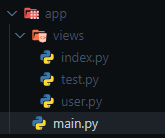
Example: Defining a Page Function
views/index.py
import flet_easy as fs
import flet as ft

# 1. Define the page function receiving 'data: fs.Datasy'
def page_index(data: fs.Datasy):
    return ft.View(
        controls=[
            ft.Text('Index Page'),
        ],
        vertical_alignment="center",
        horizontal_alignment="center"
    )
Example: Defining a Page Class
Available since version 0.2.4
Create new pages by using classes. You don't need to inherit from any specific class.
- Constructor: Must accept
data: fs.Datasyas a mandatory parameter. Any dynamic URL parameters should also be defined here. - build() method: A mandatory method that returns an
ft.View(can beasync).
views/test.py
import flet_easy as fs
import flet as ft

class PageTest:
    def __init__(self, data: fs.Datasy, id: int, name: str):
        self.data = data
        self.id = id
        self.name = name

    def build(self):
        return ft.View(
            controls=[
                ft.Text(f'User ID: {self.id}'),
                ft.Text(f'Name: {self.name}'),
                ft.FilledButton(
                    "Go to Index",
                    on_click=self.data.go("/index"),
                ),
            ],
            vertical_alignment="center",
            horizontal_alignment="center"
        )
Add routes
We import the functions or classes from the views folder, then we use the add_routes method of the FletEasy instance, in which we will add a list of Pagesy classes where we will configure the routes and the functions or classes to be used in addition to others.
main.py
# Import functions from a `views` folder
from views.user import users
from views.index import page_index
from views.test import PageTest
import flet_easy as fs

app = fs.FletEasy()

# Register routes using Pagesy objects
app.add_routes(add_views=[
    fs.Pagesy('/index', page_index, title='Home'),
    fs.Pagesy(
        '/test/{id:int}/user/{name:str}',
        PageTest,
        title='User Profile',
        protected_route=True
    ),
])

if __name__ == "__main__":
    app.run()
Pagesy
📑 The class Pagesy, it requires the following parameters:
route: text string of the url, for example('/index').view: Stores the page function.title: Define the title of the page.clear: Removes the pages from thepage.viewslist of flet. (optional)index: Define the index of the page, use in controls likeft.NavigationBarandft.CupertinoNavigationBar. (optional)cache: Boolean that preserves page state when navigating. Controls retain their values instead of resetting. Works in imperative mode, but not in declarative (@ft.component). (optional)share_data: It is a boolean value, which is useful if you want to share data between pages, in a morerestricted way. (optional) [See more]protected_route: Protects the route of the page, according to the configuration of thelogindecoratorof theFletEasyclass. (optional) [See more]custom_params: To add validation of parameters in the custom url using a dictionary, where the key is the nameof the parameter validation and the value is the custom function that must report a boolean value. [See more]middleware: It acts as an intermediary between different software components, intercepting andprocessing requests and responses. They allow adding functionalities to an application in a flexible andmodular way. (optional) [See more]