Through Decorators
Add Pages from Other Files
Use the AddPagesy class (Sub-Router) to organize pages in separate files and group them with a common URL prefix.
AddPagesy Class (Sub-Routes)
class AddPagesy:
    def __init__(
        self,
        route_prefix: str = "",
        middleware: Optional[List[Callable]] = None
    )
Parameters
route_prefix
Type: str (optional)
URL prefix prepended to all page routes in this group.
Example: route_prefix="/user" converts "/profile" to "/user/profile"
middleware
Available since version 0.3.0
Type: List[Callable] (optional)
Middleware functions automatically applied to all pages in this group.
Example:
# Define middleware
async def login_middleware(data: fs.Datasy):
    username = await data.page.client_storage.get_async("login")
    if username is None or username not in db:
        return data.redirect("/login")

# Create AddPagesy with middleware
users = fs.AddPagesy(
    route_prefix="/user",
    middleware=[login_middleware]  # Applied to all pages
)

# All pages inherit the middleware automatically
@users.page("/profile", title="Profile")
def user_page(data: fs.Datasy):
    return ft.View(controls=[ft.Text("Profile")])

@users.page("/settings", title="Settings")
def settings_page(data: fs.Datasy):
    return ft.View(controls=[ft.Text("Settings")])
Methods
page(route, **kwargs)
Decorator to add a page to the group. Same parameters as Pagesy class. (See documentation)
Supports: Sync and async functions
Complete Example
App Structure
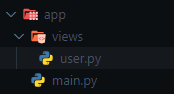
URLs created: /user/task, /user/information
Using Functions
import flet_easy as fs
import flet as ft

# Create page group with URL prefix
users = fs.AddPagesy(route_prefix="/user")

@users.page("/task", title="Task")
def task_page(data: fs.Datasy):
    return ft.View(
        controls=[
            ft.Text("Task", size=24),
            ft.FilledButton(
                "Go to Information",
                on_click=data.go("/user/information"),
            ),
        ],
        vertical_alignment="center",
        horizontal_alignment="center",
    )

@users.page("/information", title="Information")
async def information_page(data: fs.Datasy):  # Async supported
    return ft.View(
        controls=[
            ft.Text("Information", size=24),
            ft.FilledButton(
                "Back to Task",
                on_click=data.go("/user/task"),
            ),
        ],
        vertical_alignment="center",
        horizontal_alignment="center",
    )
Demo
Using Classes
Available since version 0.2.4
Requirements:
- Constructor must accept
data: fs.Datasyparameter - Must have a
build()method that returnsft.View(can be async) - No inheritance needed
Benefits: Code reusability through inheritance, better organization for complex pages.
@users.page("/test", title="Test")
class TestPage:
    def __init__(self, data: fs.Datasy):
        self.data = data
        self.counter = 0

    def increment(self, e):
        self.counter += 1
        self.data.page.update()

    async def build(self):
        return ft.View(
            controls=[
                ft.Text("Test Page", size=24),
                ft.Text(f"Counter: {self.counter}"),
                ft.ElevatedButton("Increment", on_click=self.increment),
                ft.FilledButton(
                    "Back to Task",
                    on_click=self.data.go("/user/task"),
                ),
            ],
            vertical_alignment="center",
            horizontal_alignment="center",
        )
Using Declarative Components (@ft.component)
Available since version 0.3.0
- flet >= 0.80.0 GitHub
You can now use Flet's declarative UI components (like @ft.component) natively as route handlers. Flet-Easy seamlessly delivers Datasy, your custom URL parameters, and integrates perfectly with ft.use_state() or other Flet hooks.
Note on Cache: The cache property works only in imperative mode and is currently not supported for pages using @ft.component.
Declarative Component Example
This example demonstrates how to build a full app with state management (@dataclass, @ft.observable), Flet hooks (ft.use_state), and different components linked with Flet-Easy routers (AddPagesy and @app.page).
import asyncio
from dataclasses import dataclass

import flet as ft
import flet_easy as fs

app = fs.FletEasy()

# 1. State Management for the Counter
@dataclass
@ft.observable
class CounterState:
    count: int = 0

    def add(self):
        self.count += 1

    def remove(self):
        self.count -= 1

    def reset(self):
        self.count = 0


# 2. A Reusable Declarative Sub-Component (No Route)
@ft.component
def counter():
    state, _ = ft.use_state(CounterState())

    return ft.Column(
        controls=[
            ft.Text(value=f"{state.count}", size=30),
            ft.Row(
                controls=[
                    ft.Button("Add", on_click=state.add),
                    ft.Button("Remove", on_click=state.remove),
                    ft.Button("Reset", on_click=state.reset),
                ],
                alignment="center",
            ),
        ],
        alignment="center",
        horizontal_alignment="center",
    )


# 3. Simple Middleware Example
def middleware_home(data: fs.Datasy):
    data.page.show_dialog(
        ft.SnackBar(ft.Text(f"route: {data.route} - Hello from middleware!"))
    )


# 4. Declarative App Page with `@ft.component`
@ft.component
@app.page(route="/", title="Home", middleware=middleware_home)
def App(data: fs.Datasy):

    # You can navigate natively using context...
    async def go_test():
        await ft.context.page.push_route("/test")

    # ...or use the traditional fs.Datasy go() method.
    return ft.View(
        controls=[
            counter(),  # Insert the sub-component statefully
            ft.Button("Go test (Native Context)", on_click=go_test),
            ft.Button("Go progress-bar (Flet-Easy Data)", on_click=data.go("/add-pagesy/progress-bar")),
        ],
        vertical_alignment="center",
        horizontal_alignment="center",
    )


# 5. Standard Imperative Function Route
@app.page(route="/test", title="Test")
def test(data: fs.Datasy):
    return ft.View(
        controls=[
            ft.Text("Test Page", size=30),
            ft.Button("Go Back", on_click=data.go("/")),
        ],
        vertical_alignment="center",
        horizontal_alignment="center",
    )


# 6. Another AddPagesy Group using Declarative Components
app2 = fs.AddPagesy(
    route_prefix="/add-pagesy",
    middleware=middleware_home,
)

@dataclass
@ft.observable
class AppState:
    counter: float

    async def start_counter(self):
        self.counter = 0
        for _ in range(0, 10):
            self.counter += 0.1
            await asyncio.sleep(0.5)

@ft.component
@app2.page(route="/progress-bar", title="Progress Bar")
def progress_bar(data: fs.Datasy):
    state, _ = ft.use_state(AppState(counter=0))

    async def go_back():
        await ft.context.page.push_route("/")

    return ft.View(
        controls=[
            ft.Text("Async Progress Bar Demo", size=24),
            ft.ProgressBar(state.counter, width=300),
            ft.Button("Run Progress!", on_click=state.start_counter),
            ft.Button("Go Back", on_click=go_back),
        ],
        vertical_alignment="center",
        horizontal_alignment="center",
    )

app.add_pages([app2])
app.run()
Key Takeaways
- State Independence: Notice how the
counter()component maintains its own isolated state usingft.use_state()while being inside the largerApppage view component. - Context vs
DatasyNavigation: Flet-Easy ensures that nativeft.context.page.push_route()commands anddata.go()calls stay perfectly synchronized and both are valid ways to navigate. - Combined Architecture: As shown in the
/testroute, you are fully supported to mix standard imperative functions alongside declarative component classes within your Flet-Easy application.
Demo
Adding Pages to Main App
Import and register page groups using add_pages().
import flet_easy as fs
from views.user import users

app = fs.FletEasy(route_init="/user/task")

# Add single group or list of groups
app.add_pages(users)  # or app.add_pages([users, admin, products])

app.run()
Alternative: Without AddPagesy
Available since version 0.2.7
Use @fs.page() decorator directly for standalone pages without route prefix or shared middleware.
Important
Set path_views parameter for automatic page discovery.
Main file:
import flet_easy as fs
from pathlib import Path

app = fs.FletEasy(
    route_init="/test",
    path_views=Path(__file__).parent / "views",  # Required
)

app.run()
Page file (in views/ folder):
import flet_easy as fs
import flet as ft

@fs.page(route="/test", title="Test")
def page_test(data: fs.Datasy):
    return ft.View(
        controls=[ft.Text("Test Page", size=24)],
        vertical_alignment="center",
        horizontal_alignment="center",
    )

@fs.page(route="/about", title="About")
def about_page(data: fs.Datasy):
    return ft.View(
        controls=[ft.Text("About Page", size=24)],
        vertical_alignment="center",
        horizontal_alignment="center",
    )
Summary
| Feature | AddPagesy | @fs.page() |
|---|---|---|
| Route Prefix | ✅ Yes | ❌ No |
| Shared Middleware | ✅ Yes | ❌ No |
| Best For | Grouped pages | Standalone pages |
Use AddPagesy when you need URL prefixes or shared middleware for multiple related pages.
Use @fs.page() for simple standalone pages without grouping.